
Secure Password Generator – Free Online Security Tool

In today’s digital world, protecting your online accounts is more important than ever. Weak passwords are one of the leading causes of account hacking, identity theft, and data breaches. Our Secure Password Generator – Free Online Security Tool helps you create strong, random and highly secure passwords in seconds, ensuring better protection for your personal and professional accounts.

Whether you’re creating a password for social media, email, online banking, cloud storage or business applications, this free tool generates unique passwords that are difficult to guess and resistant to brute-force attacks.
Why Strong Passwords Matter
Cybercriminals use advanced techniques to crack weak passwords. Common passwords such as:
- 123456
- password
- qwerty
- abc123
- your name or birth date
can often be cracked within seconds.
A strong password significantly reduces the risk of unauthorized access and helps keep your sensitive information secure.

Features of Our Password Generator
???? Custom Password Length
Choose password lengths ranging from 6 to 32 characters based on your security needs.
???? Uppercase Letters
Include capital letters (A-Z) to increase password complexity.
???? Lowercase Letters
Add lowercase characters (a-z) for better password variation.
???? Numbers
Use digits (0-9) to strengthen password security.
???? Special Symbols
Include symbols such as:
! @ # $ % ^ & * ( ) _ + – =
to create highly secure passwords.
???? Password Strength Indicator
The built-in strength meter instantly evaluates whether your password is:
- Weak
- Medium
- Strong
???? One-Click Copy
Copy generated passwords directly to your clipboard with a single click.
⚡ Instant Generation
Generate secure passwords instantly without page reloads.
???? Privacy-Focused
All password generation occurs directly in your browser. Your passwords are never stored, transmitted, or shared.
How to Use the Password Generator
- Select your preferred password length.
- Choose the character types you want to include.
- Click Generate Password.
- Review the generated password.
- Copy and use it for your desired account.

KeyShield
Generate secure, randomized passwords instantly
The strength indicator will automatically update as you change the password settings.
Tips for Creating Secure Passwords
Use Longer Passwords
Passwords with 12 or more characters are generally much harder to crack.
Mix Character Types
Combine uppercase letters, lowercase letters, numbers, and symbols.
Avoid Personal Information
Do not use:
- Names
- Birthdates
- Phone numbers
- Addresses
Use Unique Passwords
Every account should have its own unique password.
Enable Two-Factor Authentication (2FA)
Adding an extra verification step significantly improves account security.
Use a Password Manager
Password managers help securely store and organize complex passwords.
Who Can Use This Tool?
This password generator is useful for:
- Students
- Teachers
- Business professionals
- Website administrators
- Bloggers
- Developers
- Freelancers
- Social media users
- Online shoppers
Anyone who wants stronger online security can benefit from using this tool.
Benefits of Randomly Generated Passwords
Random passwords offer several advantages:
- Harder to guess
- Resistant to dictionary attacks
- Improved account protection
- Better compliance with security standards
- Reduced risk of password reuse
Unlike manually created passwords, randomly generated passwords contain unpredictable combinations that are far more secure.
Frequently Asked Questions (FAQs)
Is this password generator free?
Yes. The tool is completely free to use without any registration.
Are generated passwords stored?
No. Passwords are generated locally in your browser and are never saved.
What password length is recommended?
A minimum of 12 characters is recommended for most accounts. For sensitive accounts, 16-20 characters is even better.
Can I use symbols in my password?
Yes. Symbols significantly increase password strength and are recommended whenever supported.
Is this tool mobile-friendly?
Yes. The Secure Password Generator works on desktops, tablets, and smartphones.
A strong password is your first line of defense against cyber threats. Using a secure password generator helps eliminate weak and predictable passwords while improving your overall online security.
Try our Secure Password Generator today and create powerful, random passwords that help keep your accounts safe from hackers and unauthorized access.
Try Our Newly Tools????
- Free Image Compressor – Compress JPG PNG & WEBP Online
 Free Image Compressor Online – Compress JPG PNG & WEBP
- PDF Merger Ultra Pro – Merge PDF Files Online
 PDF Merger Ultra Pro – Merge PDF Files Online PDF files are widely used in school, office, and daily work. Sometimes we need to combine multiple PDF files into one single document. To solve this problem, we created PDF Merger Ultra Pro – Merge PDF Files Online, a free online tool that lets you merge… Read more: PDF Merger Ultra Pro – Merge PDF Files Online
- Image to WebP Converter – ToolHub Nepal
 Image to WebP Converter – ToolHub Nepal Transform your JPG, JPEG, PNG, BMP, GIF, TIFF and other image formats into the modern WebP format in just a few clicks. Image to WebP Converter – ToolHub Nepal works directly in your browser, allowing you to convert images quickly without installing software or creating an account. Image… Read more: Image to WebP Converter – ToolHub Nepal
- Secure Password Generator – Free Online Security Tool
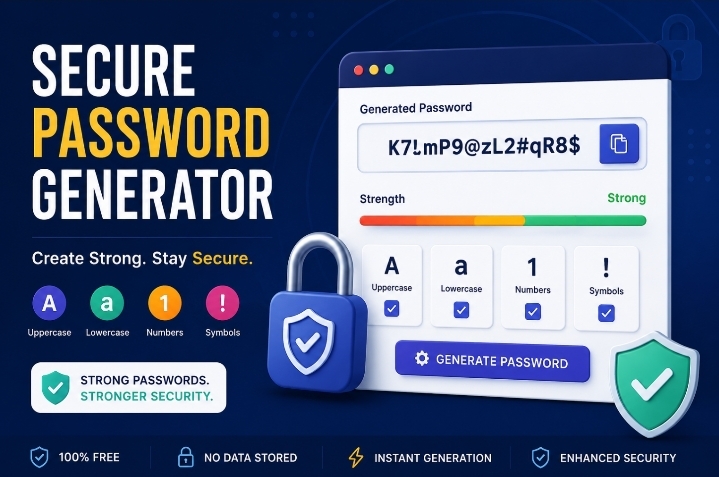 Secure Password Generator – Free Online Security Tool In today’s digital world, protecting your online accounts is more important than ever. Weak passwords are one of the leading causes of account hacking, identity theft, and data breaches. Our Secure Password Generator – Free Online Security Tool helps you create strong, random and highly secure passwords… Read more: Secure Password Generator – Free Online Security Tool
- Advanced QR Code Generator – Create Custom QR Codes Online Free
 Advanced QR Code Generator – Create Custom QR Codes Online Free Looking for a powerful and easy-to-use QR Code Generator? Our Advanced QR Code Generator – Create Custom QR Codes Online Free Tool allows you to create high-quality QR codes for websites, Wi-Fi networks, and contact information (vCard) completely free. You can customize colors, add… Read more: Advanced QR Code Generator – Create Custom QR Codes Online Free